Production Music Live
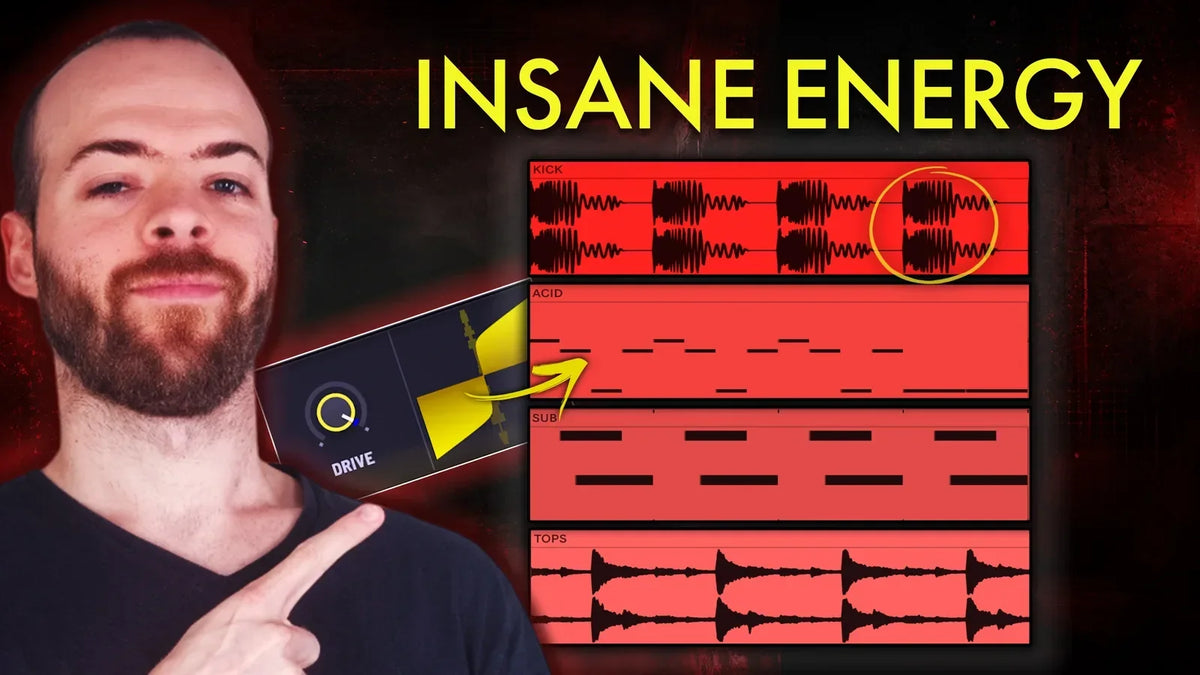
Powerful techno is never about one magic sound. It comes from how your lead, drums, bass, background layers, and arrangement lock together. This breakdown pulls a peak-time acid techno track apart into five lessons you can drop straight into your own productions: the acid lead, the drums, the layered bass, the background layers, and the arrangement.


Lesson 1: Build an Acid Lead That Drives the Track
The acid lead is the engine for relentless energy. The MIDI is deliberately simple, moving between root, octave and third with one small end variation, so the drive comes from the FX, not the melody.
Key settings:
- Saw wave with a plucky amp envelope, a little sustain for body
- Filter envelope plus resonance for the classic acid character
- Distortion modulation in the FX chain (this is where the attitude lives)
- Simple MIDI: root, octave, third, one small variation

Lesson 2: Program Techno Drums With Speed and Weight
A strong techno groove is two forces at once: speed from the hats, weight from the kick.
Key settings:
- Kick: sharp transient, a touch of distortion, a low tail for weight
- Tight closed hat to make the groove feel faster
- Ride with a longer tail for high-end energy that keeps pushing
- 909 open hat and 808 closed hat for offbeat bounce
- Extra hat loop to widen the top end

Lesson 3: Layer Your Techno Bass for Grit and Movement
One bass part rarely carries techno. Here it is three layers, each with a clear job, all sidechained to lock to the kick instead of fighting it.
Key settings:
- Sub: altered saw with a glide from B down to G, distorted and EQ'd for space
- Grit layer: squarer and more distorted, ducked and EQ'd so it never clashes with the acid lead
- Pluck: a kick-like sound on sixteenth notes, heavily sidechained for forward motion

Lesson 4: Add Background Layers for Depth
Not the star, but the track feels empty without them. Here that means pads and vocal textures that add width and emotion under the groove.
Key settings:
- Pad to fill space and widen the track
- Vocal texture for character and quiet movement
- Both mixed low so they support, never compete

Lesson 5: Arrange Techno for the Club
If you want DJs to play it, the arrangement has to be practical as well as exciting.
Key settings:
- Minimal, easy-to-mix intro with little harmony: acid line plus heavy reverb
- Build tension with atmosphere, small acid variations, and tempo automation
- Break: open up with silence, then rebuild with the acid line, an alarm, and a snare roll
- Save a bigger lead for the final drop: unison saw, fairly open filter, EQ, reverb

Grab the full project
Want to reverse-engineer every device in this track? The full Ableton project, one-shots, loops, and gritty Serum 2 presets live in Voltage. It is the fastest way to study these five lessons hands on.
Watch the full breakdown
See every step in the video:

Reference tracks
Typical reference tracks for this style are:
- Marie Vaunt - Hakanai
- Jay Lumen - Take Control
- Space 92, Malena Narvay - Formula Loca
- Nymesis, Shuhandz, Vigoire - Rave Control
- Charlotte de Witte - This (Lewis Fautzi Remix)
- Droplex, Mark Dekoda - Place to Hide
- T78, Roberto Molinaro - Bombacid
- Will Sparks - Techno Viking